Stop chasing people for paperwork
Collect Every Document. Track What's Missing. Never Chase Paper Again.
Build forms with AI, publish them as permanent links, and organize every signed document, scanned ID, and uploaded file into searchable records with compliance checklists. Know exactly what's been collected and what's still missing — for every employee, client, or vendor.
Free to start · No credit card · Unlimited users on every plan
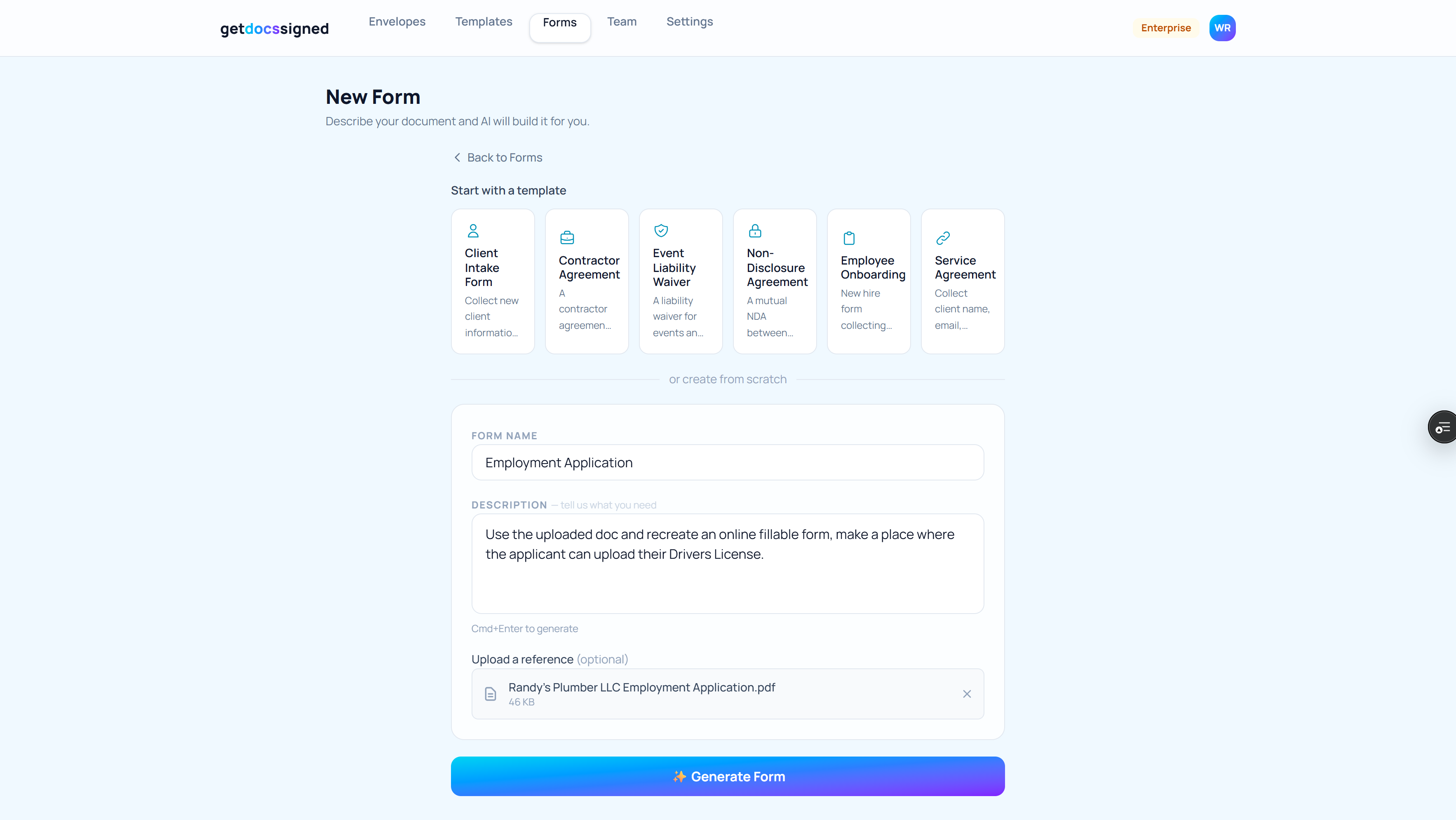
Describe your form or upload a PDF. AI builds it in minutes.
Three steps to paperless everything
Build
AI does the heavy lifting
Describe the form you need or upload an existing PDF. AI generates a complete digital form in minutes — text fields, checkboxes, signatures, file uploads, the works. No coding. No drag-and-drop headaches.
Publish
One link, used forever
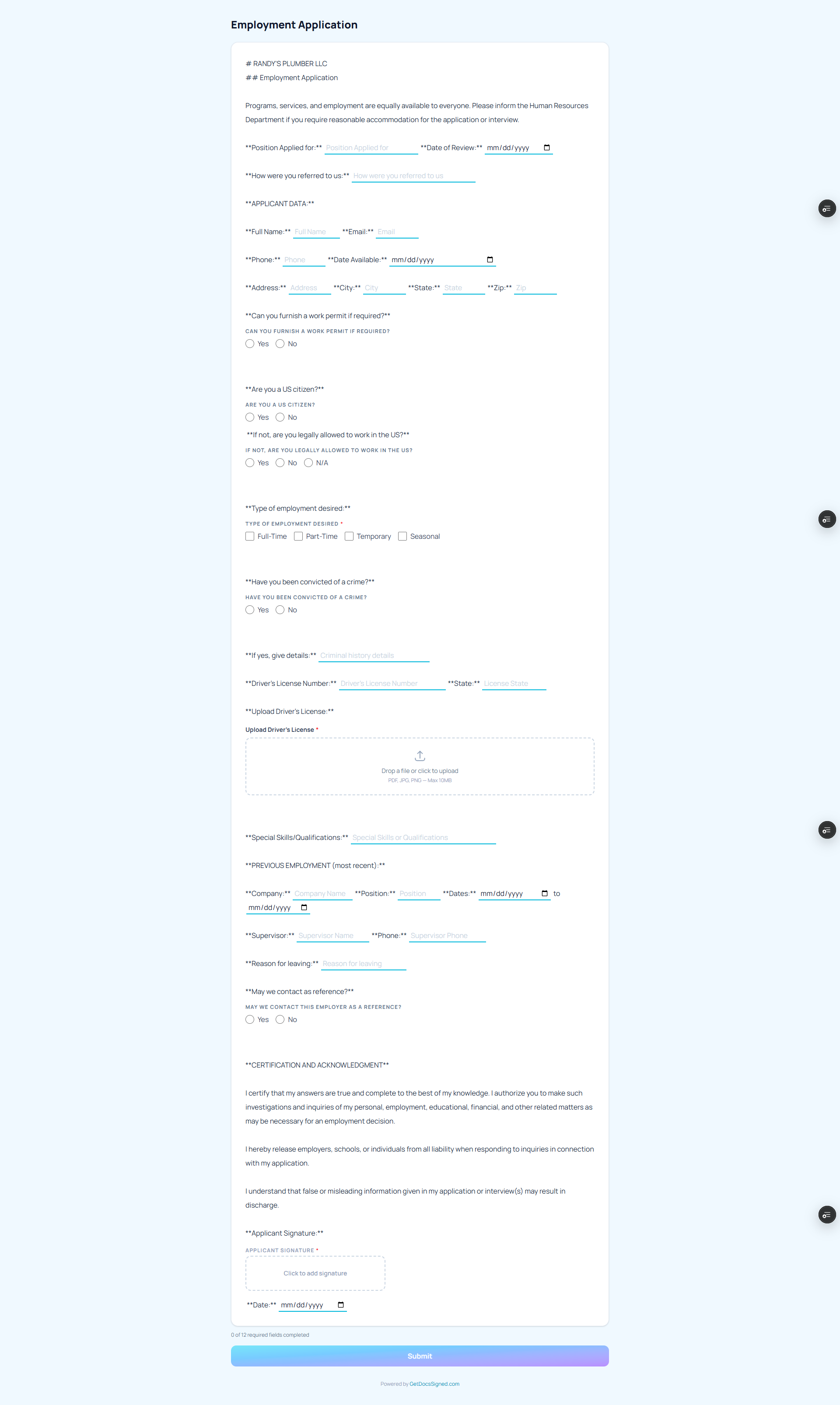
Every form gets a permanent link. Put it on your website, email it, text it. The same link works for every new hire, every client, every vendor. Respondents fill out, sign, and scan documents from their phone. No account needed.
Records
Know exactly what's missing
Every submission is stored with its signed PDF, scanned IDs, and uploaded documents. Organize into folders by employee, client, or vendor. Attach compliance checklists that auto-track what's been collected and flag what's missing. Your controller will love you.
One link. Every new hire. Every time.
Respondents fill out, sign, and scan their ID — all from one link on their phone. No account needed. No app to download.
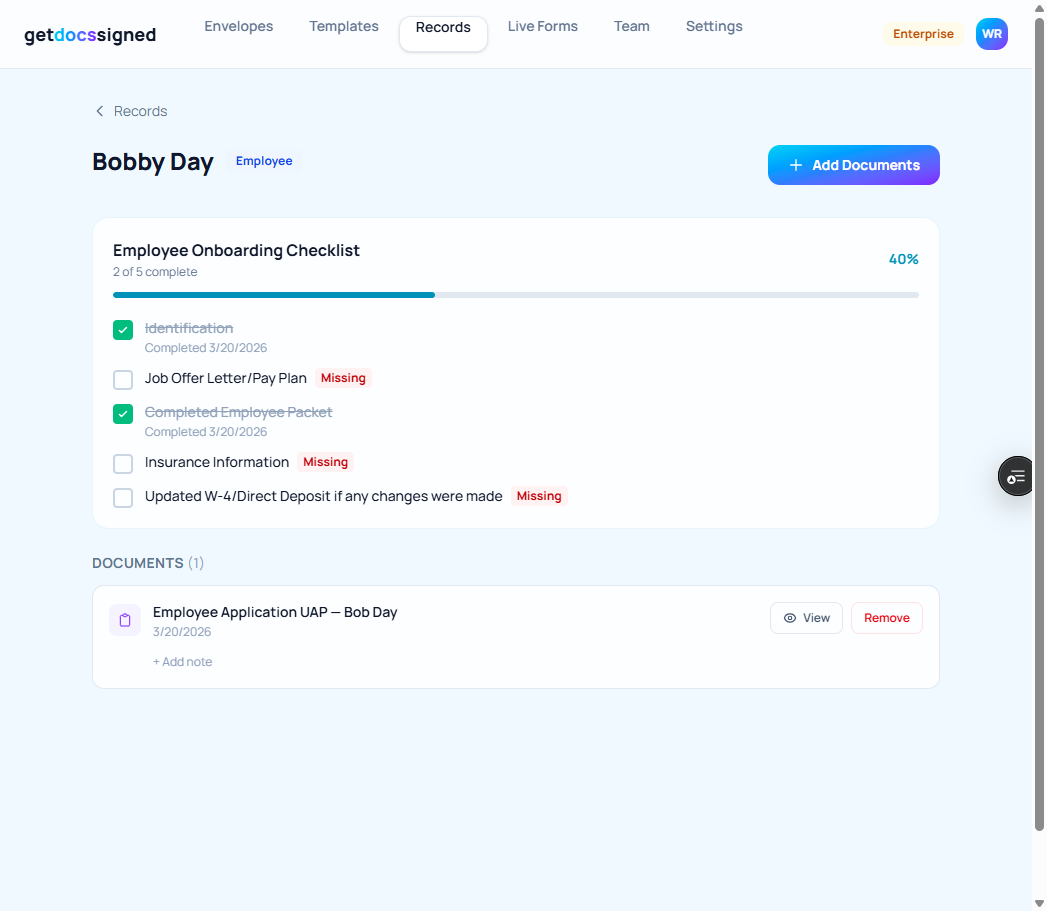
See exactly what's been collected — and what's still missing
Bobby Day's employee record — 2 of 5 onboarding documents collected. Insurance information, W-4, and job offer letter still missing.
What “doing it the old way” actually costs you
The problem isn't that people are lazy. It's that the tools don't make it easy to know what's missing.
Without GetDocsSigned
- Emailing PDFs back and forth — lost in inboxes
- Printing forms, scanning signatures, filing paper
- Chasing new hires for missing documents weeks after start date
- Shared drives full of mislabeled files nobody can find
- Controller asks "who's missing what?" — nobody knows
- One compliance audit away from a very bad day
With GetDocsSigned
- One link per form — respondents fill out, sign, and scan docs from their phone
- Every submission auto-generates a signed PDF with full audit trail
- Scanned IDs, insurance cards, and uploaded files stored permanently
- Organized folders by employee, client, or vendor
- Compliance checklists show exactly what's collected and what's missing
- Pull up any document in seconds — no digging, no asking
Automated Reminders
Set it up once.
The system does the rest.
Automated reminders chase your people for you — until every document is collected.
Create a record
Create a folder for Bobby Day. Attach your Employee Onboarding checklist.
Turn on reminders
Enter Bobby's email. Pick a frequency — every 24, 48, or 72 hours.
Bobby gets an email
'3 items missing — click here to submit.' Each item links directly to the right form.
Bobby submits
Bobby fills out the form, signs, uploads his insurance card. It auto-files into his folder.
Checklist updates automatically
The item auto-checks. When everything is complete, reminders stop. Zero manual work.
You set it up in 2 minutes. The system handles the rest — for days, weeks, or months — until every document is collected.
No more “hey did you send that W-4 yet?” emails. No more sticky notes. No more spreadsheets tracking who sent what.
Built for the documents your business actually collects
Every industry. Every document type. One system.
New Hire Paperwork — Done Before Day One
Publish an employment application link. Every new hire fills it out, signs it, and scans their driver's license from their phone. Their documents land in a folder with a checklist showing what's complete and what's still needed. No more paper applications. No more chasing people for their license.
“We used to email PDFs back and forth. Now applicants complete and sign everything in one link before their first interview.”
— HR Manager, staffing firm
Client Documents — Collected and Organized Automatically
Send a single intake form link. Clients submit their information, sign agreements, and upload certificates of insurance, W-9s, or whatever you need. Everything is stored in their folder, organized and searchable.
“Our intake form used to take 20 minutes. Now clients complete it on their phone in under five. We get a signed PDF the moment they submit.”
— Owner, consulting practice
Missing Documents — Visible at a Glance
Create checklist templates for each type of record — new employee, new vendor, new client. When documents come in, checklists update automatically. Open any folder and see exactly what's been collected and what's still outstanding. Your controller gets a compliance dashboard without lifting a finger.
“Contractors sign before they ever set foot on site. Everything is timestamped, IP-logged, and stored. Compliance loves it.”
— Operations lead, construction company
What customers say
“I uploaded our old paper employment application and had a professional digital version ready in about two minutes. The AI figured out which fields should be Yes/No questions, where the checkboxes go, even where to put the signature blocks. My applicants fill it out on their phone now and I get a signed PDF with their driver's license scan attached. We used to chase people for days to get paperwork back.”
Randy P.
Business Owner
“We switched from Jotform and immediately saved money. But honestly the money wasn't even the main thing — it was the time. Building a client intake form on Jotform took me an entire afternoon. On GetDocsSigned I described what I needed, uploaded our old PDF, and the form was done. Clients sign right inside the form, no separate e-signature tool. That alone was worth the switch.”
Samir R.
Managing Partner
“I manage onboarding for about forty new hires a year and this has completely changed how we handle it. The new employee fills out their application, signs the acknowledgments, and scans their ID all from one link on their phone. Everything comes back as a clean signed PDF that goes straight into their file. No printing, no scanning, no chasing signatures. I wish I had found this two years ago.”
Dorothy B.
HR Director
Simple pricing. Unlimited users.
One flat price. No per-user fees, no per-form fees, no per-response fees. Every plan includes forms, records, e-signatures and the AI form builder.
Starter
10 live forms, 250 responses/mo
- Unlimited users — never per seat
- 10 live forms
- 250 form responses/mo
- 25 record folders
- 25 signature envelopes/mo
- 30 AI form builds/mo
- 5 GB storage
- Phone document scanning
- Payment collection and fax available by request on paid plans
Billed monthly from the day you subscribe · Cancel anytime
Professional
50 live forms, 2,000 responses/mo
- Unlimited users — never per seat
- 50 live forms
- 2,000 form responses/mo
- 150 record folders
- 150 signature envelopes/mo
- 100 AI form builds/mo
- 25 GB storage
- Remove GetDocsSigned branding
- Compliance checklists & automated reminders
- Phone document scanning
- Payment collection and fax available by request on paid plans
Billed monthly from the day you subscribe · Cancel anytime
Business
Everything unlimited except AI builds
- Unlimited users — never per seat
- Unlimited live forms
- Unlimited form responses/mo
- Unlimited record folders
- Unlimited signature envelopes/mo
- 300 AI form builds/mo
- Unlimited storage
- Remove GetDocsSigned branding
- Compliance checklists & automated reminders
- Phone document scanning
- Payment collection and fax available by request on paid plans
Billed monthly from the day you subscribe · Cancel anytime
A 20-person team managing employee documents with BambooHR: $120–160/month— and it doesn't build forms, collect signatures, or scan IDs. GetDocsSigned does all of that from $9.99.
Also included with your account
Forms are just the start
E-Signatures
From $9.99/mo
Upload any PDF, place signature fields, send for signing. ESIGN Act compliant with full audit trail. Recipients sign in seconds — no account needed.
Learn more →Payment Links
Add-on — by request
Collect deposits, invoices, or fees alongside your forms. Attach a bill, set late fees, track every payment from your dashboard. Enabled by request on paid plans, never on free. Standard processing fees apply.
Learn more →Common questions
How does it know what documents are missing?
Do respondents need an account or app?
Are the signatures legally binding?
Can I use my existing PDF forms?
What about the documents people upload — like driver's licenses?
How is this different from just using email and shared drives?
Can multiple people on my team use it?
Stop chasing paperwork. Start tracking it.
Build your first form in minutes. See what's missing in seconds.
Turn your paperwork into online forms — freeFree to start · No credit card · Unlimited users on every plan